
Claim a container from the peel pile yourself — no need to wait on a dispatcher.
Overview
SmartStacks lets you self-assign a container directly from the yard's peel pile instead of waiting for a dispatcher to assign one to you.
Claiming a Container
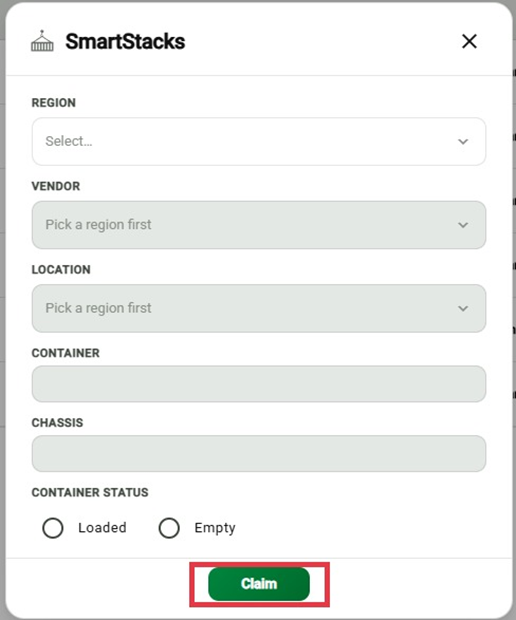
From the sidebar, select SmartStacks.
Select a Region.
Select your Vendor.
Select the Location (yard).
Enter the Container number.
Enter the Chassis number.
Select the Container Status: Loaded or Empty.
Select Claim.
Important
Region determines what's available. Select your Region first — Vendor and Location depend on it.
All fields are required to claim a container. Region, Vendor, Location, Container, Chassis, and Container Status must all be filled in before Claim is enabled.
Once claimed, it's yours. The container is assigned to you and removed from the peel pile so other vendors can't claim it.