
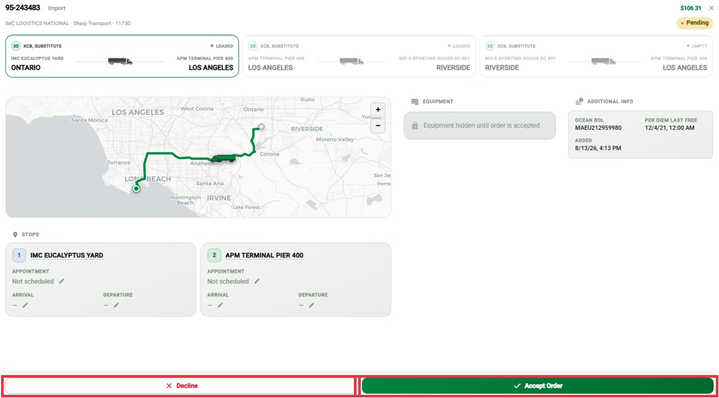
When IMC assigns you an order, you accept or decline it from the order detail panel. Here's how both work.
Accepting an Order
Open the order. Its status shows Pending.
Review the order details.
Click Accept Order.
The order status changes to Accepted.
Declining an Order
Open the Pending order.
Click Decline Order.
Select a reason from the dropdown.
Click Decline Order to confirm, or Cancel to go back without declining.
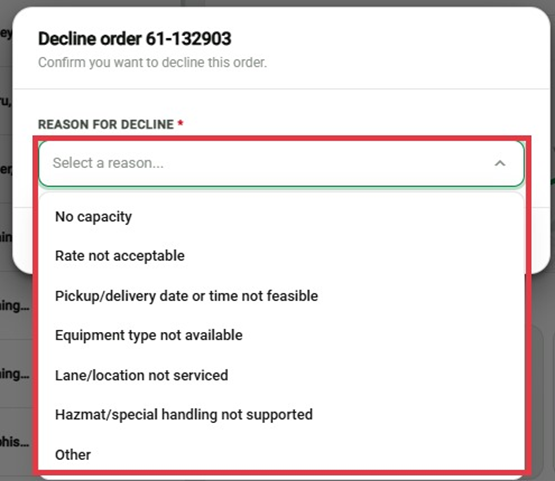
Decline reasons:
No capacity
Rate not acceptable
Pickup/delivery date or time not feasible
Equipment type not available
Lane/location not serviced
Hazmat/special handling not supported
Other
Important
A reason is required to decline an order. You can't submit the decline without selecting one.
Once you confirm a decline, the order moves to Declined status.